
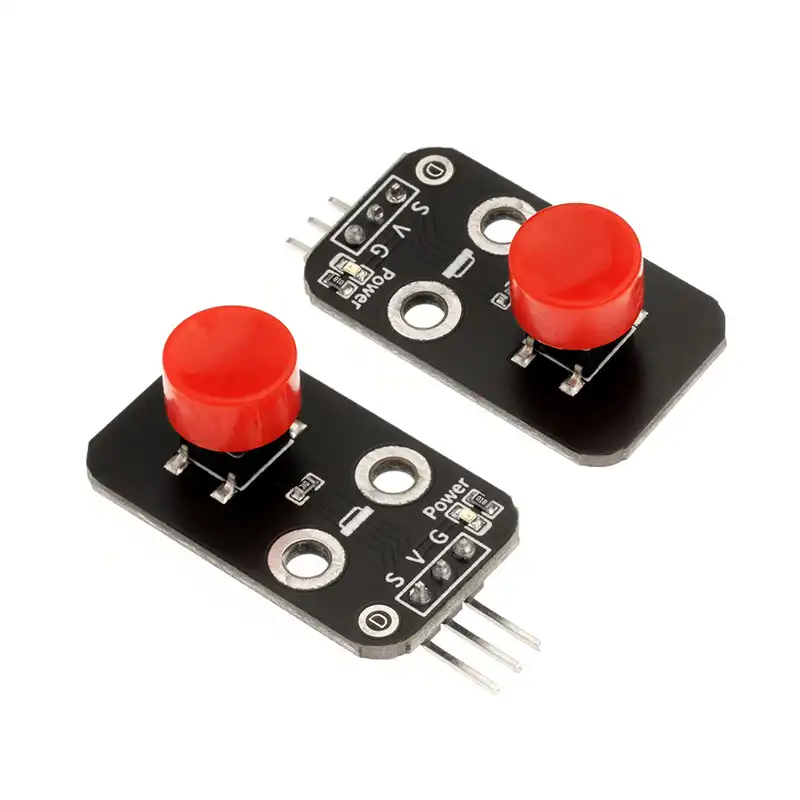
Push Button Module for Arduino Circuit Card
A push button, also known as a tactile switch, is operated by applying pressure to the switch in the direction of operation to close and connect the circuit; when the pressure is released, the switch opens and disconnects immediately. Its internal structure relies on the force-induced deformation of metal shrapnel to achieve connection and disconnection. Under normal conditions, pins 1 and 2, as well as pins 3 and 4, of the push button are connected.
When we press the push button, all four pins are connected to each other; when we release the push button, it returns to its normal state. After our module is properly connected, the red power indicator light on the module turns on. When the push button is pressed, the module outputs a low level, the signal blue light turns on, and when the push button is released, the blue light turns off and the module outputs a high level.
Specification of the button module:
| Item | Description |
|---|---|
| Product Name | Switch Module |
| MOQ: | 100pcs |
| Supply Voltage | 3.3V ~ 5.5V |
| Interface Type | 2.54mm Pin Header |
| Mounting Method | Screw Mount |
| Mounting Hole Specs | 3mm Diameter, 10mm Pitch |
| Module Dimensions | 31mm × 18mm × 16mm |
| Signal Type | Digital Signal |
| Signal Logic | Active-low: Normally outputs high level, outputs low level when pressed, resets to high level when released |
| Pin Definition | GND (Power Negative, connect to G), VCC (Power Positive, connect to V), S (Digital Signal Output) |
About MOQ of this button module:
If you only need single product, usually there is a MOQ request, like 100pcs, 50pcs etc. However, if you also purchase with another products together, like development boards, sensor modules, or development kits, then each MOQ is flexible, it means you not need order each 100pcs, smaller quantity of them are also acceptable. Our catalog contains more than 1000 assortments, welcome inquire us to get a quotation.

Reviews
There are no reviews yet.